Vision processing mode
RAM Processing submodule of OCAtari
- class ocatari.vision.game_objects.GameObject(x, y, w, h, *args)[source]
The Parent Class of every detected object in the Atari games (Vision Processing mode)
- closest_object(others)[source]
Returns the closest object from others, based on manathan distance between the center of both objects.
- Returns:
(Index, Object) from others
- Return type:
- property h_coords
History of coordinates, i.e. current (x, y) and previous (x, y) position.
- is_on_top(other)[source]
Returns
Trueif this and another gameobject overlap.- Returns:
True if objects overlap
- Return type:
- manathan_distance(other)[source]
Returns the manathan distance between the center of both objects.
- Returns:
Manathan distance (in pixel)
- Return type:
- property properties
All the properties of the object in a list.
- Returns:
The properties of the object.
- Return type:
- ocatari.vision.utils.assert_in(observed, expected, tol)[source]
Asserts if the observed point is equal to the expected one with a given tolerance. True if ||observed - expected|| <= tol, with || the maximum over the two dimensions.
- ocatari.vision.utils.color_analysis(image, bbox, exclude=[])[source]
Returns a Counter of all the detected colors in the bounding box
- ocatari.vision.utils.find_mc_objects(image, colors, size=None, tol_s=10, position=None, tol_p=2, min_distance=10, closing_active=True, closing_dist=3, minx=0, miny=0, maxx=160, maxy=210, all_colors=True)[source]
Finds the multicolors objects in the image.
This functions is used to detect object in e.g. Atlantis (depicted bellow).

- Parameters:
image (np.array) – The image to mark the point on
size (int or (int, int)) – presupposed size of the targeted object (to detect)
tol_s (int or (int, int)) – tolerance on the presupposed size of the targeted object
size – presupposed size of the targeted object (to detect)
tol_s – tolerance on the presupposed size of the targeted object
position (int or (int, int)) – presupposed position of the targeted object (to detect)
tol_p (int or (int, int)) – tolerance on the presupposed position of the targeted object
min_distance (int) – tolerance on the presupposed position of the targeted object
closing_active (bool) – If true, gathers in one bounding box the instances that are less than closing_dist
closing_dist (int) – The closing distance, for the under which two (or more) instances are merged into one bounding box.
minx (int) – minimum x position where the object can be located
miny (int) – minimum y position where the object can be located
maxx (int) – maximum x position where the object can be located
maxy (int) – maximum y position where the object can be located
all_colors (bool) – If
True, only return the object if every given color in colors is present in the image
- Returns:
a list of tuple boxing boxes
- Return type:
- ocatari.vision.utils.find_objects(image, color, size=None, tol_s=10, position=None, tol_p=2, min_distance=10, closing_active=True, closing_dist=3, minx=0, miny=0, maxx=160, maxy=210)[source]
Finds the single colored objects in the image.
- Parameters:
image (np.array) – The image to mark the point on
size (int or (int, int)) – presupposed size of the targeted object (to detect)
tol_s (int or (int, int)) – tolerance on the presupposed size of the targeted object
position (int or (int, int)) – presupposed position of the targeted object (to detect)
tol_p (int or (int, int)) – tolerance on the presupposed position of the targeted object
closing_active (bool) – If true, gathers in one bounding box the instances that are less than closing_dist away.
closing_dist (int) – The closing distance, for the under which two (or more) instances are merged into one bounding box.
minx (int) – minimum x position where the object can be located
miny (int) – minimum y position where the object can be located
maxx (int) – maximum x position where the object can be located
maxy (int) – maximum y position where the object can be located
- Returns:
a list of tuple boxing boxes
- Return type:
- ocatari.vision.utils.find_objects_in_color_range(image, color_min, color_max, size=None, tol_s=10, position=None, tol_p=2, min_distance=10, closing_active=True, closing_dist=3, minx=0, miny=0, maxx=160, maxy=210)[source]
Finds the single colored objects in the image.
- Parameters:
image (np.array) – image to mark the point on
color_min ((int, int, int)) – lower bound of the color spectrum
color_max ((int, int, int)) – upper bound of the color spectrum
size (int or (int, int)) – presupposed size of the targeted object (to detect)
tol_s (int or (int, int)) – tolerance on the presupposed size of the targeted object
size – presupposed size of the targeted object (to detect)
tol_s – tolerance on the presupposed size of the targeted object
position (int or (int, int)) – presupposed position of the targeted object (to detect)
tol_p (int or (int, int)) – tolerance on the presupposed position of the targeted object
closing_active (bool) – If true, gathers in one bounding box the instances that are less than closing_dist
closing_dist (int) – The closing distance, for the under which two (or more) instances are merged into one bounding box.
minx (int) – minimum x position where the object can be located
miny (int) – minimum y position where the object can be located
maxx (int) – maximum x position where the object can be located
maxy (int) – maximum y position where the object can be located
- Returns:
a list of tuple boxing boxes
- Return type:
- ocatari.vision.utils.find_rectangle_objects(image, color, max_size=None, minx=0, miny=0, maxx=160, maxy=210)[source]
Finds rectangle objects with a given maximum size.
- Parameters:
- Returns:
a list of tuple boxing boxes
- Return type:
- ocatari.vision.utils.find_rope_segments(image, color, seg_height=(2, 5), minx=0, miny=0, maxx=160, maxy=210)[source]
Finds the rope segments (max rope width of 1) of a displayed rope.
- Parameters:
image (np.array) – The image to mark the point on
seg_height (int or (int, int)) – interval in which segments are considered
minx (int) – minimum x position where the object can be located
miny (int) – minimum y position where the object can be located
maxx (int) – maximum x position where the object can be located
maxy (int) – maximum y position where the object can be located
- Returns:
a list of tuple boxing boxes
- Return type:
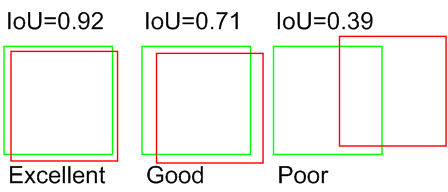
- ocatari.vision.utils.iou(bb, gt_bb)[source]
Computes the intersection over union between two bounding boxes.
- ocatari.vision.utils.mark_bb(image_array, bb, color=(255, 0, 0), surround=True)[source]
Marks a bounding box on the image.
- ocatari.vision.utils.mark_point(image_array, x, y, color=(255, 0, 0), size=1, show=False, cross=True)[source]
Marks a point on the image at the (x,y) position (inplace)
- Parameters: